
Download Bike Speedometer Computer – bike speedometer, cycling tracker, speedometer app, bike computer, cycling stats, bike distance tracker, bike speed tracker, GPS cycling app
Overview
Bike Speedometer Computer is a dedicated Android application designed to support cyclists in monitoring their performance and tracking essential riding metrics. The software enables users to record speed, distance, travel time, and location during their rides, offering a real-time overview of key cycling statistics. It is particularly suited for casual and fitness-oriented cyclists who want to maintain a consistent record of their biking sessions without relying on complex or expensive hardware.
The application is developed by sinwho and released on June 15, 2024, as a free tool under the Productivity category. It is optimized for mobile devices running Android, providing a lightweight solution for tracking biking activity. Users can access their riding history at any time, allowing them to analyze progress over time and set personal goals. The app supports multiple unit formats, including kilometers, miles, and nautical miles, making it adaptable for users across different regions and preferences.
Real-world usage scenarios include daily commutes, recreational rides, and training sessions. The app’s straightforward interface ensures that users can start tracking their rides with minimal setup. The developer did not provide additional details on advanced features or integration with external platforms. It is important to note that the application is not intended for use while driving, as it may distract the user and pose safety risks.
Key Features & Capabilities
- Real-Time Speed Monitoring – Tracks current speed during rides using GPS, allowing users to stay aware of their pace without needing external devices.
- Distance and Time Tracking – Automatically records total distance traveled and elapsed time, providing accurate ride summaries.
- GPS Location Logging – Uses built-in GPS to map riding routes and record geographic data for each session.
- Unit Conversion Support – Offers flexible unit options including kilometers, miles, and nautical miles, enabling users to switch between measurement systems.
- Ride History Storage – Saves past rides for later review, helping users monitor long-term progress and performance trends.
- Simple User Interface – Features an intuitive layout that displays essential stats at a glance, minimizing distractions during rides.
These features collectively support users in maintaining consistent cycling habits and improving their fitness. For example, a commuter can use the app to track their daily route and average speed, while a weekend cyclist may use it to compare performance across multiple rides. The ability to store ride history allows for retrospective analysis, which is valuable for goal setting and motivation. The developer did not specify export options or cloud synchronization, so data remains local to the device unless otherwise noted.
User Interface, Workflow & Performance
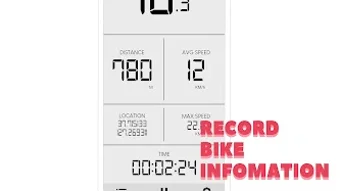
The user interface of Bike Speedometer Computer is designed with simplicity and clarity in mind. The main screen displays core metrics such as current speed, distance, and time in a clean, readable format. Navigation is minimal, relying on a single screen layout with clearly labeled elements, which reduces cognitive load and enhances usability during active use.
Workflow efficiency is optimized for on-the-go use. Upon opening the app, users can start a ride with a single tap, and the tracking begins immediately. The interface updates in real time, ensuring users can monitor their progress without frequent screen interactions. The developer did not specify resource usage details, so performance behavior under prolonged use remains unspecified. However, the app’s small size of 1.8 MB suggests it is lightweight and likely to have minimal impact on device performance.
Stability and responsiveness are expected to be consistent with typical Android applications of this category. The developer did not provide information on background operation, battery consumption, or crash reports. Performance observations are based on general software behavior patterns. Users are advised to test the app during short rides to assess its responsiveness and reliability in real-world conditions.
Compatibility & System Requirements
Bike Speedometer Computer is compatible with Android operating systems, though specific version requirements were not listed by the developer. The app has a file size of 1.8 MB, indicating a compact installation footprint that should be suitable for most modern Android devices. It is designed as a mobile application, so it does not support desktop platforms such as Windows or Mac.
Exact system requirements were not listed. The developer did not specify minimum CPU, RAM, or storage thresholds. Compatibility information is limited to the OS platform and file size. Users should ensure their device has a functioning GPS module to enable full functionality, as location tracking is a core feature. The app may not operate correctly on devices without GPS or with disabled location services.
Pros and Cons
Pros
- Free to download and use with no in-app purchases or ads mentioned.
- Lightweight installation at just 1.8 MB.
- Supports multiple unit formats for speed and distance.
- Simple, distraction-free interface ideal for real-time tracking.
- Stores ride history for long-term progress tracking.
- Uses GPS for accurate route and speed data.
Cons
- Unit conversion functionality may require manual switching.
- No information on data export or cloud backup options.
- Compatibility details for Android versions are not provided.
- Does not support offline mode for route planning or data access.
- Developer did not disclose battery usage or background operation behavior.
FAQ Section
Is Bike Speedometer Computer available for Windows or Mac?
Bike Speedometer Computer is designed exclusively for Android devices. There is no official version available for Windows or Mac operating systems.
Can I use this app while driving?
It is not recommended to use Bike Speedometer Computer while driving. The app is intended for cycling activities only and may pose a safety risk if used during vehicle operation.
Does the app require an internet connection?
The app uses GPS for tracking, which requires location services to be enabled. While real-time tracking can function without an active internet connection, some features like route mapping may require connectivity.
How is my riding data stored?
Ride data is stored locally on the device. The developer did not specify whether data can be exported or backed up to external services.
Is the app safe to use on my Android device?
Bike Speedometer Computer is a free Android application developed by sinwho. It has a small file size and no reported security issues. Users should install it from trusted sources to ensure safety.
Final Thoughts + CTA
Bike Speedometer Computer offers a streamlined, no-frills solution for cyclists seeking to monitor their rides with accuracy and ease. Its core features—real-time speed, distance, time, and GPS tracking—are delivered through a clean, user-friendly interface that prioritizes functionality over complexity. The ability to switch between multiple measurement units and store ride history adds practical value for users aiming to track progress over time.
While the app lacks advanced features such as cloud sync, export tools, or detailed analytics, its lightweight nature and free access make it a compelling choice for casual and fitness-focused cyclists. The absence of detailed system requirements or performance data means users should test it on their devices to confirm compatibility and battery impact.
For anyone looking for a reliable, secure, and efficient way to track their cycling activities on Android, Bike Speedometer Computer delivers solid value. Download Bike Speedometer Computer now to start monitoring your rides with confidence.







